Designing for an Audience
In this post, I would like to go over some of my design decisions for my project, Zagrock.
The Visuals
I am someone who likes to visualize things before I start building them. Before writing a single line of code for Zagrock, I wanted to design high-fidelity mockups.
Around 2020, the main design tool at the time was Sketch. However, instead of going with Sketch, I had heard about a newer tool on the block called Figma.
I chose to start my designs in Figma because it was free and browser-based, so I didn’t have to download any additional software.
The Audience
Instead of designing this app just for myself, I wanted to think about who my potential audience might be.
At the time of writing, I imagine my audience to be gamers, cosplayers, and people from creative backgrounds. With that in mind, I wanted the design to avoid looking corporate while still following solid UX best practices.
Figuring Out Features
Some of the core features I wanted included:
- Account creation and management
- User profiles
- Avatar customization
- Cosmetic store
- Currency system
- Forum-like system with nested comments
- Art sharing
- Basic moderation tools
Early Designs
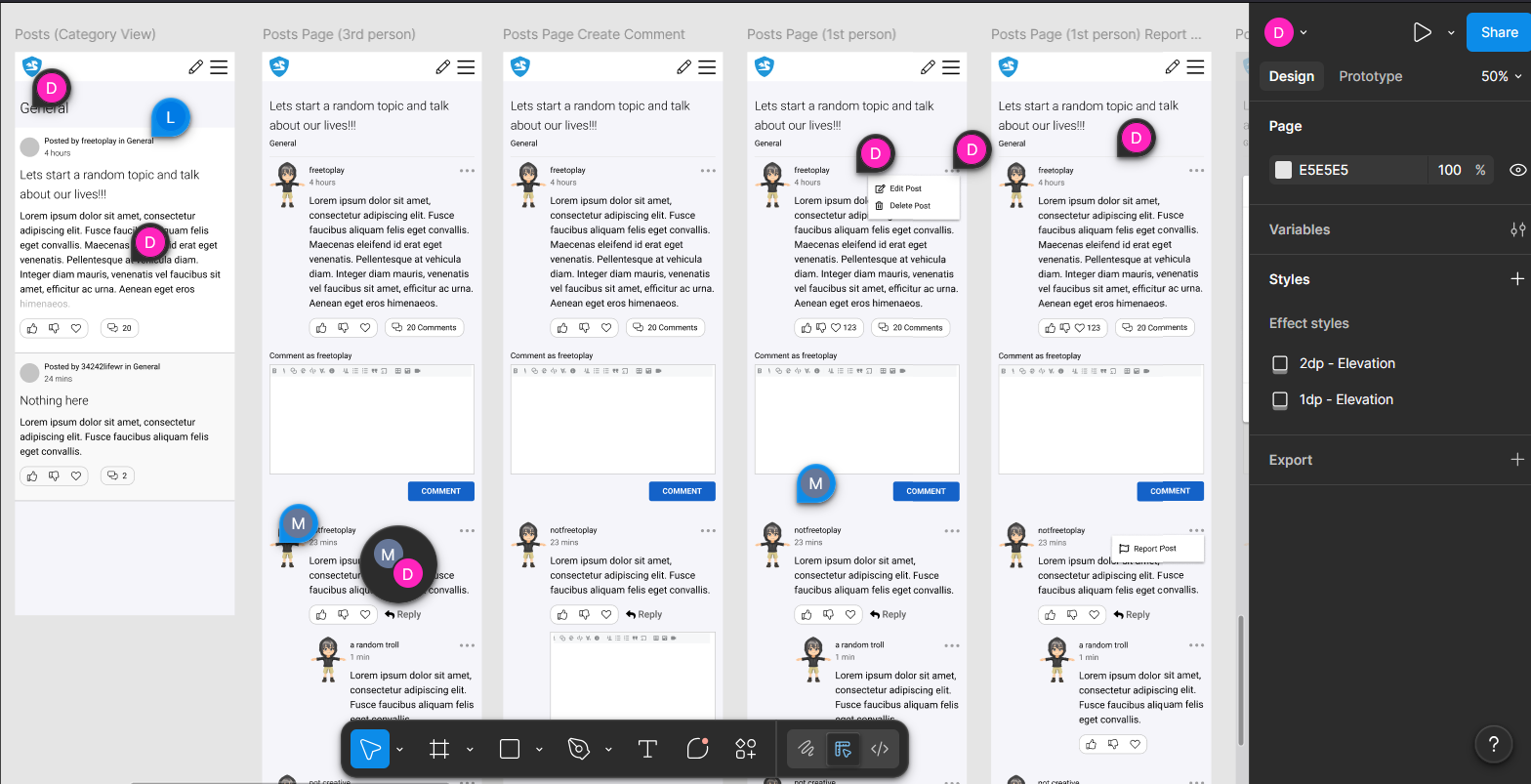
Here is a look at some early designs. The initial concepts focused on the mobile experience. To save time (I’m a solo developer!), I chose to forgo tablet and desktop designs unless I knew the UX would differ significantly from mobile.
While working on the designs, I paid close attention to visual hierarchy and carefully thought through how users would interact with the 3D avatar system. As I started coding the application, I would apply changes as needed because sometimes what seems to work well in the design does not work as well in a real application.
The Avatar System
Unlike the other features in the app, where real-world data exists on what works and what doesn’t, the avatar system didn’t have that kind of reference point.
So instead, I had a few friends test out a live demo and give feedback. It’s not scientific, and the sample size was small, but it was a starting point.
A couple of things stood out from that feedback:
It wasn’t obvious that the avatar was actually 3D. To address this, I added a grab cursor to make it feel more interactive. I also plan to adjust the avatar’s pose to better communicate depth.
Adding the grab cursor introduced another issue: the interactive area was too large and interfered with scrolling on mobile devices. On mobile, the avatar appears at the top of the page, and my original implementation made the entire 3D canvas draggable. When my friend tried scrolling, the avatar rotated instead. I fixed this by activating the grab cursor and rotation only when the user directly interacted with the avatar itself, rather than the entire 3D scene. I’ll go into more detail about how I implemented this in a separate post.
Getting Some Feedback
Since the app hasn’t been deployed yet, I don’t have access to real production user feedback.
During the design stage, I collected feedback from friends using Figma. That early feedback helped uncover UX issues that I didn’t notice while designing.
When I release a minimum viable product, I plan to gather feedback from real users and continue iterating on the design.
That’s all I have for design decisions for now. Next up, I’ll talk about how I chose the UI tech stack!